自己实现一个ClickHouse的MCP
来源:互联网 更新时间:2026-06-22 17:48
探索ClickHouse的MCP实现,从零构建到开源分享,带你深入了解ClickHouse的数据处理能力。
核心内容:
- ClickHouse MCP的实现背景与动机
- 构建ClickHouse MCP的详细步骤与代码解析
- 写入ClickHouse的假数据生成与表结构设计
背景
最近看到一篇关于GreptimeDB的MCP文章,效果挺酷的。于是尝试用ClickHouse也做一份,前后大概花了几个小时。目前项目已经开源在GitHub上(dubin555/clickhouse_mcp_server)。GitHub上其实已经有两三个现成的实现,但当前这个版本在代码和注释的完整度上,应该算是做得比较充分的。
效果
写数据
首先向ClickHouse写入一些假数据,这里准备了一组模拟的销售数据(随便什么数据都行,可以让豆包、元宝帮忙生成假数据,很方便)。
-- Create sales analysis table with comments
CREATE TABLE IF NOT EXISTS default.city_sales
(
    city String COMMENT 'Name of the city where the sale occurred',
    product_category Enum('Electronics' = 1, 'Apparel' = 2, 'Grocery' = 3) COMMENT 'Category of the product sold',
    sale_date Date COMMENT 'Date of the sales transaction',
    units_sold UInt32 COMMENT 'Number of units sold in the transaction',
    unit_price Float32 COMMENT 'Price per unit in USD',
    total_sales Float32 MATERIALIZED units_sold * unit_price COMMENT 'Calculated total sales amount'
) ENGINE = MergeTree()
PARTITION BY toYYYYMM(sale_date)
ORDER BY (city, product_category, sale_date)
COMMENT 'Table storing city-wise product sales data for business analysis';

-- Generate 10,000 random sales records
INSERT INTO default.city_sales (city, product_category, sale_date, units_sold, unit_price)
SELECT
    ['New York', 'London', 'Tokyo', 'Paris', 'Singapore', 'Dubai'][rand() % 6 + 1] AS city,
    toInt16(rand() % 3 + 1) AS product_category,
    today() - rand() % 365 AS sale_date,
    rand() % 100 + 1 AS units_sold,      -- Units between 1-100
    randNormal(50, 15) AS unit_price     -- Normal distribution around $50
FROM numbers(10000);
表中的字段包括城市、销售品类、产品、销售额等一系列维度。
提问
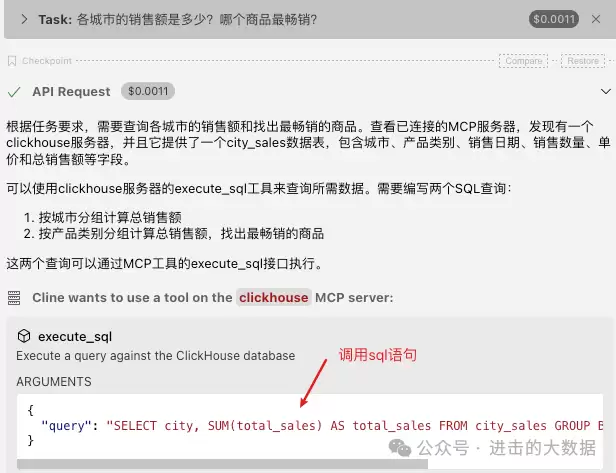
接下来开始提问(这里用的客户端是VSCode的Cline插件):
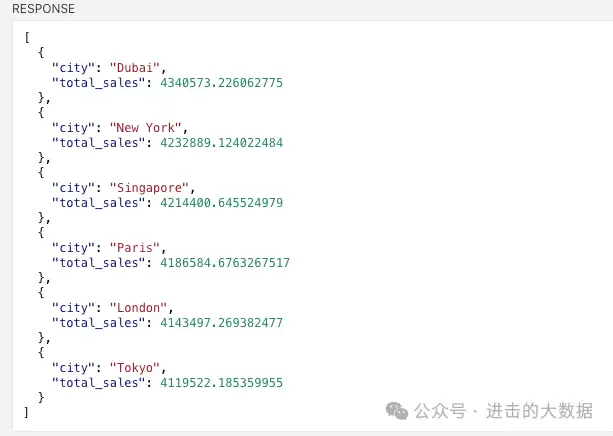
- 各城市的销售额是多少?
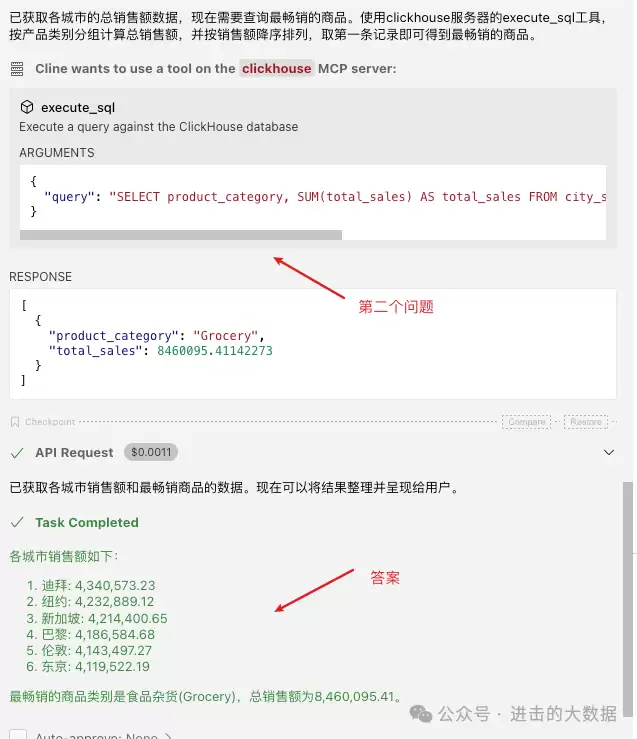
- 哪个商品最畅销?
LLM的第一次调用:
实现
在GitHub上参考了两三个已有的实现,整体逻辑并不复杂。完整的代码可以去仓库查看,这里重点讲解最关键的一个文件——server.py。
整体
里面包含5个主要的类:
- :负责创建ClickHouse连接,发起查询。
ClickHouseClient
- :负责查询表的元数据,例如有哪些列、注释等信息。
TableMetadataManager
- :负责构造给LLM的提示,展示有哪些Resource可以访问,内部会调用TableMetadataManager。
ResourceManager
- :负责提示LLM有哪些Tool可以使用,以及调用这些Tool,内部会调用ClickHouseClient。
ToolManager
- :整合上面4个类的信息,完成最终的MCP服务器。
DatabaseServer
具体实现
ClickHouseClient
class ClickHouseClient:
    """ClickHouse database client"""

    def __init__(self, config: Config, logger: Logger):
        self.logger = logger
        self.db_config = {
            "host": config.host,
            "port": int(config.port),
            "user": config.user,
            "password": config.password,
            "database": config.database
        }
        self._client = None

    def get_client(self):
        """Get ClickHouse client, singleton pattern"""
        if self._client is None:
            self._client = self._create_client()
        return self._client

    def _create_client(self):
        """Create a new ClickHouse client"""
        try:
            self.logger.debug(f"Creating ClickHouse client with config: {self.db_config}")
            client = clickhouse_connect.get_client(**self.db_config)
            version = client.server_version
            self.logger.info("ClickHouse client created successfully")
            return client
        except Exception as e:
            self.logger.error(f"Failed to create ClickHouse client: {e}")
            raise

    def execute_query(self, query: str, readonly: bool = True):
        """Execute a query against the ClickHouse database"""
        try:
            client = self.get_client()
            settings = {"readonly": 1} if readonly else {}
            res = client.query(query, settings=settings)

            # convert result to list of dicts
            rows = []
            for row in res.result_rows:
                row_dict = {}
                for i, col_name in enumerate(res.column_names):
                    row_dict[col_name] = row[i]
                rows.append(row_dict)

            self.logger.debug(f"Query executed successfully: {query}")
            return rows
        except Exception as e:
            self.logger.error(f"Failed to execute query: {e}")
            raise
TableMetadataManager
class TableMetadataManager:
    """Manage table metadata in ClickHouse"""
    def __init__(self, client: ClickHouseClient, logger: Logger):
        self.client = client
        self.logger = logger

    def get_table_list(self, database: str) -> List[str]:
        """Get list of tables in the database"""
        query = f"SHOW TABLES FROM {quote_identifier(database)}"
        result = self.client.execute_query(query)
        if not result:
            return []
        return [row[next(iter(row.keys()))] for row in result]

    def get_table_comments(self, database: str) -> Dict[str, str]:
        """Get comments for the tables in the database"""
        query = f"SELECT name, comment FROM system.tables WHERE database = {format_query_value(database)}"
        result = self.client.execute_query(query)
        return {row['name']: row['comment'] for row in result}

    def get_column_comments(self, database: str) -> Dict[str, Dict[str, str]]:
        """Get comments for the columns in the tables in the database"""
        query = f"SELECT table, name, comment FROM system.columns WHERE database = {format_query_value(database)}"
        result = self.client.execute_query(query)

        column_comments = {}
        for row in result:
            table, col_name, comment = row['table'], row['name'], row['comment']
            if table not in column_comments:
                column_comments[table] = {}
            column_comments[table][col_name] = comment
        return column_comments

    def format_table_description(self, table_name: str, table_comment: str, columns_info: Dict[str, str]) -> str:
        """Format table description for the model"""
        description = f"Table: {table_name}\n"
        if table_comment:
            description += f"Description: {table_comment}\n"
        else:
            description += "Description: No description provided\n"

        if columns_info:
            # Add column descriptions
            description += "Columns:\n"
            for col_name, col_comment in columns_info.items():
                if col_comment:
                    description += f"  - {col_name}: {col_comment}\n"
                else:
                    description += f"  - {col_name}: No description provided\n"

        return description
ResourceManager
class ResourceManager:
    """MCP resource manager"""

    def __init__(self, client: ClickHouseClient, logger: Logger
                 , resource_prefix: str = DEFAULT_RESOURCE_PREFIX
                 , results_limit: int = DEFAULT_RESULTS_LIMIT):
        self.client = client
        self.logger = logger
        self.metadata_manager = TableMetadataManager(client, logger)
        self.resource_prefix = resource_prefix
        self.results_limit = results_limit

    async def list_resources(self) -> List[Resource]:
        """List all resources in the database"""
        self.logger.debug("Listing resources")
        database = self.client.db_config.get("database")

        try:
            # Get table list
            table_list = self.metadata_manager.get_table_list(database)
            if not table_list:
                return []

            # Get table comments and column comments
            table_comments = self.metadata_manager.get_table_comments(database)
            column_comments = self.metadata_manager.get_column_comments(database)

            # Format table descriptions
            resources = []
            for table_name in table_list:
                table_comment = table_comments.get(table_name, "")
                columns_info = column_comments.get(table_name, {})
                description = self.metadata_manager.format_table_description(table_name, table_comment, columns_info)

                # Create resources
                resource = Resource(
                    uri=f"{self.resource_prefix}/{table_name}/data",
                    name=f"Table: {table_name}",
                    mimeType="text/plain",
                    description=description,
                    type="table",
                    metadata = {
                        "columns": [
                            {
                                "name": col_name,
                                "description": col_comment
                            }
                            for col_name, col_comment in columns_info.items()
                        ]
                    }
                )
                resources.append(resource)
            self.logger.debug(f"Found {len(resources)} resources")
            return resources
        except Exception as e:
            self.logger.error(f"Failed to list resources: {e}")
            return []

    async def read_resource(self, uri: AnyUrl) -> str:
        """Read resource data"""
        self.logger.debug(f"Reading resource: {uri}")
        uri_str = str(uri)

        try:
            # Parse URI
            if not uri_str.startswith(self.resource_prefix):
                self.logger.error(f"Invalid resource URI: {uri}")
                return ""

                # get talbe name
                table_name = uri_str[len(self.resource_prefix):].split("/")[0]

                # get query
                query = f"SELECT * FROM {quote_identifier(table_name)} LIMIT {self.results_limit}"
                result = self.client.execute_query(query)

                # format result
                if not result:
                    return "No data found"
                return json.dumps(result, default=str , indent=2)
        except Exception as e:
            self.logger.error(f"Failed to read resource: {e}")
            return f"Error reading resource: {str(e)}"
ToolManager
class ToolManager:
    """MCP tool manager"""

    def __init__(self, client: ClickHouseClient, logger: Logger):
        self.client = client
        self.logger = logger

    async def list_tools(self) -> List[Tool]:
        """List all tools"""
        self.logger.debug("Listing tools")
        return [
            Tool(
                name="execute_sql",
                description="Execute a query against the ClickHouse database",
                inputSchema={
                    "type": "object",
                    "properties": {
                        "query": {
                            "type": "string",
                            "description": "The SQL query to be executed"
                        }
                    },
                    "required": ["query"],
                }
            )
        ]

    async def call_tool(self, name: str, arguments: Dict[str, Any]) -> List[TextContent]:
        """Call a tool"""
        self.logger.debug(f"Calling tool: {name} with arguments: {arguments}")

        # Tool handler mapping
        tool_handlers = {
            "execute_sql": self._handle_execute_sql
        }

        # Get handler
        handler = tool_handlers.get(name)
        if not handler:
            self.logger.error(f"Tool not found: {name}")
            return []

        # Call handler
        return await handler(arguments)

    async def _handle_execute_sql(self, arguments: Dict[str, str]) -> List[TextContent]:
        """Handle execute_sql tool"""
        self.logger.debug("Handling execute_sql tool")
        # Get query
        query = arguments.get("query")
        if not query:
            self.logger.error("Query is required")
            return []

        # Check query
        is_dangerous, pattern = dangerous_check(query)
        if is_dangerous:
            self.logger.error(f"Dangerous query detected: {pattern}")
            return [TextContent(value=f"Error: Dangerous query detected: {pattern}")]

        try:
            # Execute query
            result = self.client.execute_query(query)
            json_result = json.dumps(result, default=str, indent=2)
            return [
                TextContent(
                    type='text',
                    text=json_result,
                    mimeType='application/json'
                )
            ]
        except Exception as e:
            self.logger.error(f"Failed to execute query: {e}")
            return [TextContent(type='text', text=f"Error executing query: {str(e)}")]
DatabaseServer
class DatabaseServer:
    """MCP database server"""
    def __init__(self, config: Config, logger: Logger):
        self.app = Server("clickhouse_mcp_server")
        self.logger = logger

        # create components
        self.client = ClickHouseClient(config, logger)
        self.resource_manager = ResourceManager(self.client, logger)
        self.tool_manager = ToolManager(self.client, logger)

        # register components
        self.app.list_resources()(self.resource_manager.list_resources)
        self.app.read_resource()(self.resource_manager.read_resource)
        self.app.list_tools()(self.tool_manager.list_tools)
        self.app.call_tool()(self.tool_manager.call_tool)

    async def run(self):
        """Run the server"""
        from mcp.server.stdio import stdio_server

        self.logger.info("Starting server")
        async with stdio_server() as (read_stream, write_stream):
            try:
                await self.app.run(
                    read_stream,
                    write_stream,
                    self.app.create_initialization_options()
                )
            except Exception as e:
                self.logger.error(f"Server error: {e}")
                raise
通过这几个模块的组合,一套完整的ClickHouse MCP服务器就搭建起来了。实际使用时,只需在VSCode的Cline或类似MCP客户端中配置好连接,就能直接用自然语言查询和分析数据,体验远比手动写SQL要流畅。

-
《Off Campus》第二季官宣:这对CP还在,但不再是主角
-
客单价碾压宝马奥迪!极氪5月交付新车34377辆:连续4个月双增长
-
币安Binance虚拟货币交易平台 币安官方APP安卓苹果下载入口
-
HBO 奇幻剧《龙之家族》第三季定档 6 月 22 日,最终预告片曝光喉道海战
-
帅气继父网名女生可爱英文(精选100个)
-
帅到极致的网名女生霸气(精选100个)
-
折后价近千元 澳洲一店主将真老鼠缝到内裤上当时尚单品卖
-
如何在夸克浏览器中开启网页视频的倍速播放功能?
-
蒙古上单是什么梗
-
DOTA2 TI时隔七年重返上海!门票6月10日开抢,国服享受优先购买!
-
作家助手如何上传自制封面 作家助手如何设置小说的封面
-
韦一敏是什么梗
-
韩漫小少爷网名大全女生(精选100个)
-
网络热词聊污是什么意思
-
archiveofourown 实战指南:常见用法整理
-
有寓意的易经网名男生(精选100个)
-
欧易OKX官方网站直达入口 2026欧易官方App安卓版v7.1.0下载安装
-
抖音最火沙雕男生网名(精选100个)
-
阿里发布Qwen3.7-Max大模型,全球第五、国产第一
-
小众游戏抖音网名男生(精选100个)
-
1 用腾讯ima对微信读书书架分类,还是DeepSeek懂我 06-22
-
2 Cline 浪费 token?记忆库助你提质增效,成本骤减! 06-22
-
5 Cline 3.8.0:工作流集成、账户管理与供应商优化 06-22
-
6 核对2个表格,Deepseek才是YYDS,看我30秒搞定! 06-22
-
7 阿福号召“科学减重1亿斤”,专家:减重难在坚持,AI能搭把手 06-22
-
8 美国新提案:「国有化」AI巨头,「全民持股」50% 06-22
-
9 谷歌强推 AI 搜索引发用户不满 功能异常反向为竞品引流 06-22
-
10 当 5 亿人放弃 ChatGPT 06-22