高级 RAG 检索策略之查询路由
来源:互联网 更新时间:2026-08-22 14:36
之前聊 Self-RAG 时提到过按需检索这个功能——它根据用户的问题来判断是否需要检索文档,如果不需要就直接返回 LLM 的生成结果,既提升了系统性能,也让用户体验更好。在 Self-RAG 里,按需检索是靠经过特殊训练的 LLM 实现的,但在高级 RAG 架构中,我们可以用
查询路由
查询路由
查询路由,说白了就是 RAG 系统里的一个智能分发器。它根据用户输入的语义内容,从多个候选方案中挑出最合适的处理路径或数据源。这能显著提升检索的相关性和效率,尤其适合那些需要把用户查询分发到不同知识库的复杂场景。灵活又聪明,是构建高效 RAG 的关键组件。
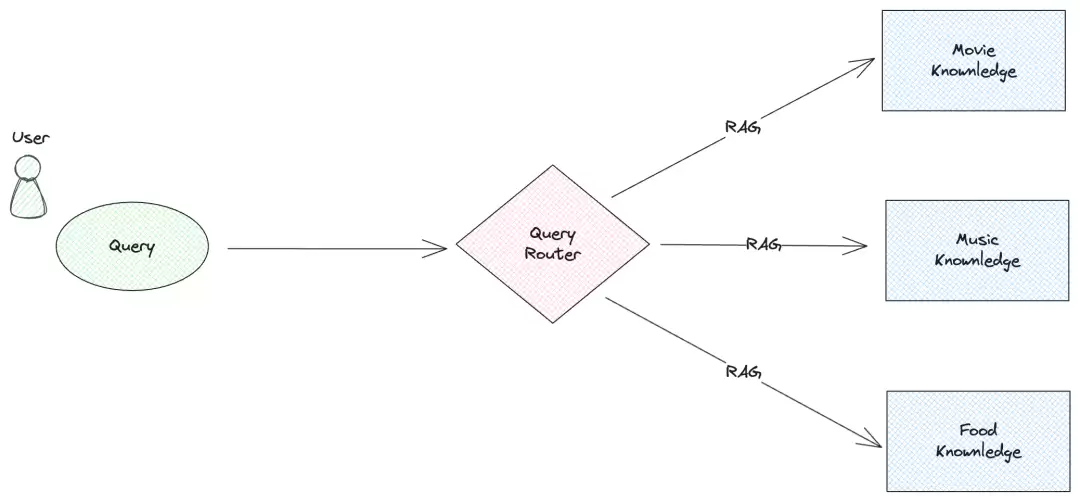
查询路由的类型
根据实现原理,查询路由可以分成两大流派:
- :通过构造有效的提示词,让大语言模型来判断用户问题的意图。比如 LlamaIndex 里的 Router 系列。
LLM Router
- :先用 Embedding 模型把用户问题转成向量,然后做相似性检索,从而判定意图。典型代表是 Semantic Router。
Embedding Router
下面分别看看它们的具体实现。
LLM Router
用 LLM 来识别用户意图,是目前 RAG 里很常见的路由方式。操作也简单:在提示词里列出所有可能的类别,让 LLM 把问题归类,然后根据分类结果走不同的处理分支。
LlamaIndex[1] 用的就是这个思路。它提供了好几种查询路由实现,比如 RouterRetriever、RouterQueryEngine、RouterComponent,核心原理都差不多:初始化时需要一个选择器和一个工具组件列表,选择器会给出工具组件的序号,然后根据序号选对应的工具去执行。以 RouterQueryEngine 为例,代码大概是这样的:
from llama_index.core.query_engine import RouterQueryEngine
from llama_index.core.selectors import LLMSingleSelector
from llama_index.core.tools import QueryEngineTool

# initialize tools
list_tool = QueryEngineTool.from_defaults(
    query_engine=list_query_engine,
    description="Useful for summarization questions related to the data source",
)
vector_tool = QueryEngineTool.from_defaults(
    query_engine=vector_query_engine,
    description="Useful for retrieving specific context related to the data source",
)

# initialize router query engine (single selection, llm)
query_engine = RouterQueryEngine(
    selector=LLMSingleSelector.from_defaults(),
    query_engine_tools=[
        list_tool,
        vector_tool,
    ],
)
query_engine.query("")
先搭两个工具:
list_tool用于总结类问题(背后是SummaryIndex),vector_tool用于向量检索(背后是VectorStoreIndex)。接着实例化
RouterQueryEngine,把选择器和工具列表传进去。这里用的选择器是
LLMSingleSelector,它靠 LLM 判断意图并返回单个结果。最后调
query_engine.query传入用户问题,引擎自动匹配工具并执行。
下面是 LlamaIndex Router 的流程图:
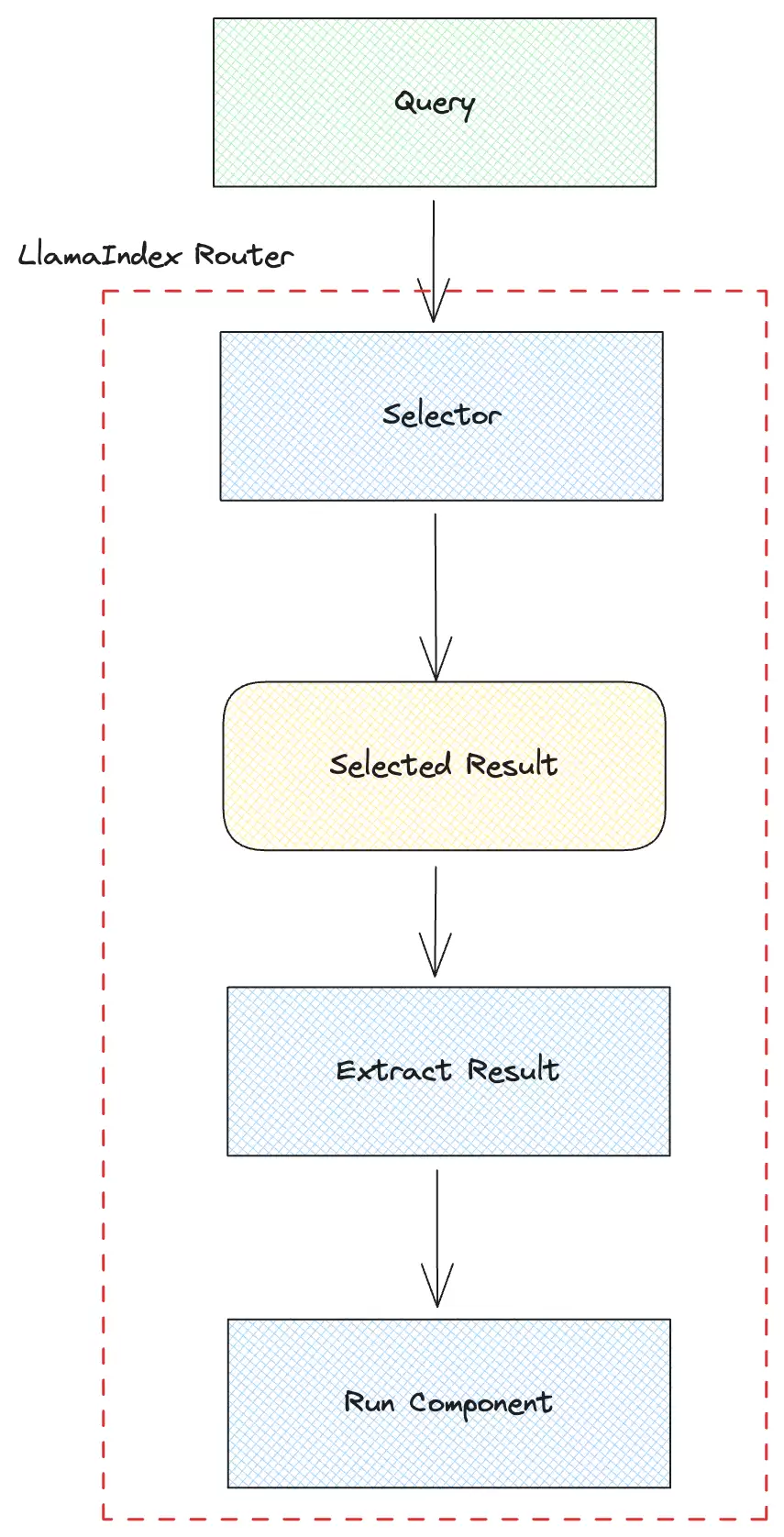
选择器先根据问题拿到选择结果。
然后从结果里提取工具组件的序号。
再按序号选中对应的工具并执行。
LlamaIndex 里选择器有 4 种:
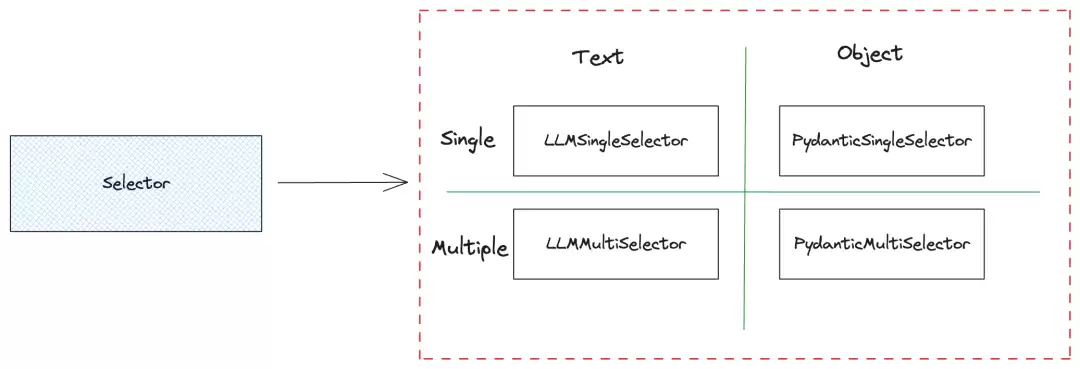
这 4 种都是靠 LLM 来判断意图的。按选择结果的数量来分,有单个结果和多个结果两种——多个结果会合并成一个最终结论。按解析结果来分,有文本结果和对象结果两种:文本结果用的是 LLM 的 completion API,输出的格式是 SingleSelection,包含 index 和 reason 字段)。2 种解析结果的示例:
# Text selector
2. Useful for questions related to oranges

# Object selector
SingleSelection(index=2, reason="Useful for questions related to oranges")
用文本选择器拿到结果后还得额外提取序号,而对象选择器直接拿属性就行,省事不少。
再看一下 Selector 的默认提示词模板:
DEFAULT_SINGLE_SELECT_PROMPT_TMPL = (
    "Some choices are given below. It is provided in a numbered list "
    "(1 to {num_choices}), "
    "where each item in the list corresponds to a summary.\n"
    "---------------------\n"
    "{context_list}"
    "\n---------------------\n"
    "Using only the choices above and not prior knowledge, return "
    "the choice that is most relevant to the question: '{query_str}'\n"
)
这是
LLMSingleSelector的默认提示词模板。{num_choices}是选项总数,{context_list}是工具组件的编号和描述,{query_str}是用户问题。
用 LLM Router 的关键在于构造有效的提示词。如果 LLM 足够强,提示词不用太精细也能奏效;但如果模型本身不够聪明,那就得反复调提示词才能拿到满意结果。笔者在实际使用 LlamaIndex Router 时发现,如果选的是 OpenAI 的 gpt-3.5-turbo,用 LLMSingleSelector 偶尔会解析失败,换成 PydanticSingleSelector 就稳定多了。
拿到选择结果的序号后,直接用它去选工具组件就完了。RouterQueryEngine 的核心逻辑如下:
class RouterQueryEngine(BaseQueryEngine):
    def _query(self, query_bundle: QueryBundle) -> RESPONSE_TYPE:
        ......
        result = self._selector.select(self._metadatas, query_bundle)
        selected_query_engine = self._query_engines[result.ind]
        final_response = selected_query_engine.query(query_bundle)
        ......
先通过选择器得到选择结果。
再根据结果里的序号从
_query_engines里挑出对应的检索引擎。最后调用该引擎的
query方法输出最终答案。
优缺点
- :方法直观,实现简单。
优点
- :需要比较强的 LLM 才能准确判断意图;如果想把结果解析成对象,还得 LLM 支持 Function Calling。
缺点
Embedding Router
查询路由的另一种方案是靠 Embedding 模型。把用户问题向量化,然后计算向量相似度来给问题分类,最后根据分类结果选对应的处理方式。
Semantic Router[2] 就是基于这个原理的工具,主打超快决策,靠语义向量做快速判断,提升 LLM 应用和 AI Agent 的效率。用起来非常简单:
import os
from semantic_router import Route
from semantic_router.encoders import CohereEncoder, OpenAIEncoder
from semantic_router.layer import RouteLayer

# we could use this as a guide for our chatbot to a void political conversations
politics = Route(
    name="politics",
    utterances=[
        "isn't politics the best thing ever",
        "why don't you tell me about your political opinions",
        "don't you just love the president",
        "they're going to destroy this country!",
        "they will sa ve the country!",
    ],
)

# this could be used as an indicator to our chatbot to switch to a more
# conversational prompt
chitchat = Route(
    name="chitchat",
    utterances=[
        "how's the weather today?",
        "how are things going?",
        "lovely weather today",
        "the weather is horrendous",
        "let's go to the chippy",
    ],
)

# we place both of our decisions together into single list
routes = [politics, chitchat]

# OpenAI Encoder
os.environ["OPENAI_API_KEY"] = ""
encoder = OpenAIEncoder()

rl = RouteLayer(encoder=encoder, routes=routes)

rl("don't you love politics?").name
# politics
rl("how's the weather today?").name
# chitchat
先定义两个 Route:
politics和chitchat,每个 Route 里放几个示例语句。然后创建一个 Encoder(这里用了 OpenAI 的 Encoder,底层是 Embedding 模型)。
最后实例化
RouteLayer,把 Encoder 和 Route 列表传进去。直接调用
rl传入用户问题,就能拿到分类名称。不过要注意:并不是所有问题都能匹配到预设分类,如果超出范围,返回的名称可能是空。
OpenAI Encoder 默认用的是 text-embedding-3-small,比之前的 text-embedding-ada-002 效果更好、价格更低。Semantic Router 还支持其他 Encoder,比如 Huggingface Encoder 默认用的是 sentence-transformers/all-MiniLM-L6-v2[3],这是一个句子转换模型,能把句子和段落映射到 384 维向量空间,适合分类或语义搜索。
优缺点
- :只用 Embedding 模型,相比 LLM Router 效率更高、资源消耗更少。
优点
- :需要提前录入一些示例语句;如果示例不够多或不全面,分类效果可能打折扣。
缺点
查询路由实践
下面我们把 LlamaIndex 和 Semantic Router 结合起来,搭一个真实的查询路由。它会根据用户问题把流量分到 3 个不同的工具组件:跟 LLM 闲聊、走标准 RAG 流程检索文档并生成答案、以及用 Bing 搜索引擎做网络搜索。
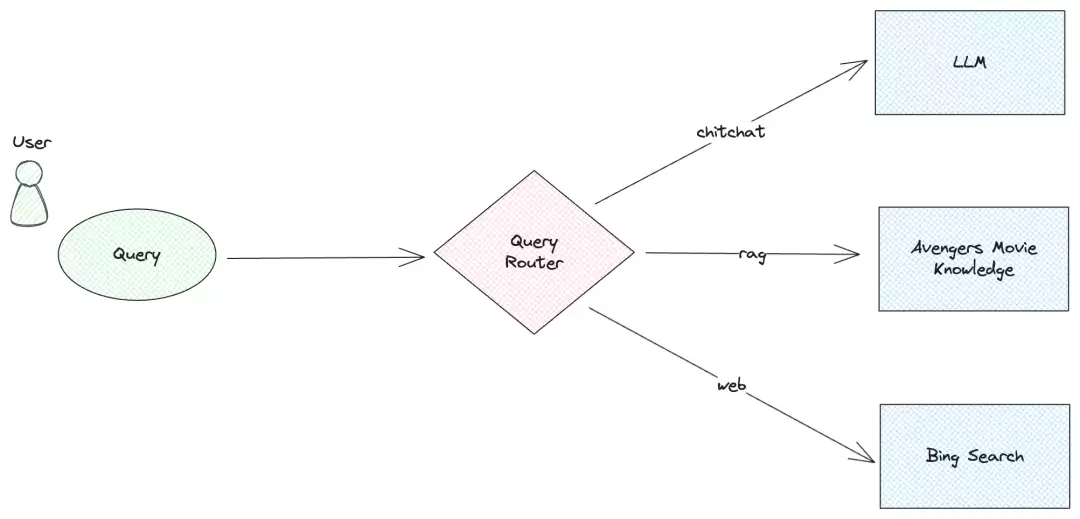
先搞一个闲聊工具组件。这里用 LlamaIndex 的 Pipeline[4] 功能来构建查询流水线(更多用法可以参考之前的文章):
from llama_index.llms.openai import OpenAI
from llama_index.core.query_pipeline import QueryPipeline, InputComponent

llm = OpenAI(model="gpt-3.5-turbo", system_prompt="You are a helpful assistant.")
chitchat_p = QueryPipeline(verbose=True)
chitchat_p.add_modules(
{
    "input": InputComponent(),
    "llm": llm,
}
)
chitchat_p.add_link("input", "llm")
output = chitchat_p.run(input="hello")
print(f"Output: {output}")

# 显示结果
Output: assistant: Hello! How can I assist you today?
用 OpenAI 的
gpt-3.5-turbo建一个 LLM。用
QueryPipeline构建流水线,加入input和llm两个模块(input是输入组件,默认参数键名是input)。连接两个模块,然后调
run方法传入用户问题,拿到回答。
接下来是普通 RAG 工具组件,同样用流水线来搭。测试文档还是用维基百科上复仇者联盟[6] 的电影剧情:
from llama_index.core import SimpleDirectoryReader, VectorStoreIndex
from llama_index.core.response_synthesizers.tree_summarize import TreeSummarize

documents = SimpleDirectoryReader("./data").load_data()
index = VectorStoreIndex.from_documents(documents)
retriever = index.as_retriever(similarity_top_k=2)
rag_p = QueryPipeline(verbose=True)
rag_p.add_modules(
{
    "input": InputComponent(),
    "retriever": retriever,
    "output": TreeSummarize(),
}
)

rag_p.add_link("input", "retriever")
rag_p.add_link("input", "output", dest_key="query_str")
rag_p.add_link("retriever", "output", dest_key="nodes")
output = rag_p.run(input="Which two members of the A vengers created Ultron?")
print(f"Output: {output}")

# 显示结果
Output: Tony Stark and Bruce Banner.
前面是 LlamaIndex 常规的检索器构建:
SimpleDirectoryReader加载文档,VectorStoreIndex建索引。然后建流水线,加三个模块:
input、retriever、output(output是树形总结组件)。连接关系:
output需要同时用input和retriever的输出。最后跑一下,传入问题,得到答案。
再来一个 Bing 搜索引擎的工具组件。同样用流水线,但这次得自定义模块:
web_p = QueryPipeline(verbose=True)
web_p.add_modules(
{
    "input": InputComponent(),
    "web_search": WebSearchComponent(),
}
)
web_p.add_link("input", "web_search")
网络搜索工具只有两个模块:
input和web_search。WebSearchComponent是自定义模块,下面详细说。
在实现这个自定义模块之前,得先在 Azure 上创建一个 Bing 搜索服务,拿到 API Key(具体操作见微软官方文档[7])。然后安装 LlamaIndex 的 Bing 查询工具库:pip install llama-index-tools-bing-search。接下来开始实现自定义组件:
import os
from typing import Dict, Any
from llama_index.core.query_pipeline import CustomQueryComponent
from llama_index.tools.bing_search import BingSearchToolSpec
from llama_index.agent.openai import OpenAIAgent

class WebSearchComponent(CustomQueryComponent):
"""Web search component."""

    def _validate_component_inputs(self, input: Dict[str, Any]) -> Dict[str, Any]:
        """Validate component inputs during run_component."""
        assert "input" in input, "input is required"
        return input

    @property
    def _input_keys(self) -> set:
        """Input keys dict."""
        return {"input"}

    @property
    def _output_keys(self) -> set:
        return {"output"}

    def _run_component(self, **kwargs) -> Dict[str, Any]:
        """Run the component."""
        tool_spec = BingSearchToolSpec(api_key=os.getenv("BING_SEARCH_API_KEY"))
        agent = OpenAIAgent.from_tools(tool_spec.to_tool_list())
        question = kwargs["input"]
        result = agent.chat(question)
        return {"output": result}
重点看
_run_component方法。先创建一个
BingSearchToolSpec对象,传入 API Key(这里从环境变量BING_SEARCH_API_KEY里取)。然后用 LlamaIndex 的 Agent 功能:
OpenAIAgent结合 Bing 搜索工具。最后从
kwargs["input"]拿到用户问题,传给agent.chat,返回搜索结果。Bing 查询工具的更多用法可以参考官方文档[9]。
三个工具组件都准备好了,现在需要搭一个路由模块,用 Semantic Router 来实现。先定义三个 Route:
chitchat = Route(
    name="chitchat",
    utterances=[
        "how's the weather today?",
        "how are things going?",
        "lovely weather today",
        "the weather is horrendous",
        "let's go to the chippy",
    ],
)

rag = Route(
    name="rag",
    utterances=[
        "What mysterious object did Loki use in his attempt to conquer Earth?",
        "Which two members of the A vengers created Ultron?",
        "How did Thanos achieve his plan of exterminating half of all life in the universe?",
        "What method did the A vengers use to reverse Thanos' actions?",
        "Which member of the A vengers sacrificed themselves to defeat Thanos?",
    ],
)

web = Route(
    name="web",
    utterances=[
        "Search online for the top three countries in the 2024 Paris Olympics medal table.",
        "Find the latest news about the U.S. presidential election.",
        "Look up the current updates on NVIDIA’s stock performance today.",
        "Search for what Musk said on X last month.",
        "Find the latest AI news.",
    ],
)
三个 Route 分别对应闲聊、RAG 检索、网络搜索。
rag的示例是复仇者联盟剧情相关的问题,web的示例里有很多Search、Find这样的关键词。
接下来实现自定义路由组件:
from llama_index.core.base.query_pipeline.query import (
    QueryComponent,
    QUERY_COMPONENT_TYPE,
)
from llama_index.core.bridge.pydantic import Field

class SemanticRouterComponent(CustomQueryComponent):
"""Semantic router component."""

    components: Dict[str, QueryComponent] = Field(
        ..., description="Components (must correspond to choices)"
    )

    def __init__(self, components: Dict[str, QUERY_COMPONENT_TYPE]) -> None:
        """Init."""
        super().__init__(components=components)

    def _validate_component_inputs(self, input: Dict[str, Any]) -> Dict[str, Any]:
        """Validate component inputs during run_component."""
        return input

    @property
    def _input_keys(self) -> set:
        """Input keys dict."""
        return {"input"}

    @property
    def _output_keys(self) -> set:
        return {"output", "selection"}

    def _run_component(self, **kwargs) -> Dict[str, Any]:
        """Run the component."""
        if len(self.components) < 1:
            raise ValueError("No components")
        if chitchat.name not in self.components.keys():
            raise ValueError("No chitchat component")

        routes = [chitchat, rag, web]
        encoder = OpenAIEncoder()
        rl = RouteLayer(encoder=encoder, routes=routes)
        question = kwargs["input"]
        selection = rl(question).name
        if selection is not None:
            output = self.components[selection].run_component(input=question)
        else:
            output = self.components["chitchat"].run_component(input=question)
        return {"output": output, "selection": selection}
构造器里接收一个字典,键是 Route 名,值是对应的工具组件。
_output_keys返回两个输出键:结果和选择结果。_run_component里先校验是否包含chitchat(用于兜底)。然后用 Semantic Router 判断意图,拿到选择结果
selection。根据
selection选对应的工具组件去执行;如果没匹配到,就 fallback 到chitchat。
最后,把所有东西拼到一个总流水线里:
p = QueryPipeline(verbose=True)
p.add_modules(
{
    "router": SemanticRouterComponent(
        components={
            "chitchat": chitchat_p,
            "rag": rag_p,
            "web": web_p,
        }
    ),
}
)
总流水线只有一个模块
router,就是上面自定义的路由组件。路由组件里传入了三个子流水线。
因为只有一个模块,不需要加链接。
试试效果:
output = p.run(input="hello")
# Selection: chitchat
# Output: assistant: Hello! How can I assist you today?

output = p.run(input="Which two members of the A vengers created Ultron?")
# Selection: rag
# Output: Tony Stark and Bruce Banner.

output = p.run(input="Search online for the top three countries in the 2024 Paris Olympics medal table.")
# Selection: web
# Output: The top three countries in the latest medal table for the 2024 Paris Olympics are as follows:
# 1. United States
# 2. China
# 3. Great Britain
路由工作得很好,不同意图的问题被精准分发到了对应的工具组件,并产出正确的结果。
总结
这次我们聊了 RAG 检索策略中的查询路由,介绍了 LLM Router 和 Embedding Router 两种实现原理,最后通过一个完整的实战项目,展示了查询路由在实际系统里怎么用。不过话说回来,目前的查询路由还存在一些不确定性,不能保证每次都做出完全准确的决策。只有经过精心测试和调优,才能打造出更可靠的 RAG 应用。
-
腾讯ima怎么把微信内容一键导入知识库?
-
黄金价格不断创新高!黄金稳定币XAU、PAXG市值达11亿美元
-
CC币价格预测(2026-2035):Canton币今日价格走势+长期价格预测
-
腾讯ima怎么创建共享知识库?
-
Celestia价格预测2026-2032:TIA币能否引领山寨币上涨行情?历史价格回顾
-
新浪互联网热点小时报丨2026年07月26日16时_今日实时互联网热点速递
-
新浪机器学习热点小时报丨2026年07月25日18时_今日实时机器学习热点速递
-
比特币(BTC)核心周期指标复刻历史走势 价格或跌破5.8万美元关键支撑位
-
新浪人工智能热点小时报丨2026年07月30日18时_今日实时人工智能热点速递
-
WorkBuddy微信版怎么获得积分?
-
车载冰箱重置到出厂设置几步?
-
5000元起的鼠标哪个最值得入手?
-
比特币 2025 年价格预测:BTC 的未来走势
-
笔记本移动电源推荐哪款?
-
结婚家电首选:Leader懒人三筒Ultra热泵洗烘一体
-
短剧《史上最强洪荒修为》剧情介绍
-
kimi提示词专家使用方法新手指南
-
Aptos(APT)2026-2032年价格预测与历史走势梳理
-
短剧《仙人跳获透视,古玩玉器我全拿捏》剧情介绍
-
腾讯ima知识库怎么分类管理?
-
1

- 我好喜欢你是什么梗?
- 角色扮演 |
-
2
- 新学期开学季祝福语简短励志(15篇)
- 角色扮演 |
-
3
- 寒露祝福语温馨的话(30篇)
- 角色扮演 |
-
4
- 每天一条早上问候短信
- 角色扮演 |
-
5
- 秋分时节祝福词(20篇)
- 角色扮演 |
-
1 AI模型:如何选择合适的 Embedding 模型? 08-22
-
4 MiniCPM-Llama3-V-2_5 微调记录 08-22
-
5 如何微调Meta Llama-3 8B 08-22
-
6 兴奋剂检测迎来AI时代:最新AI模型能够精准预测兴奋剂使用 08-22
-
8 RPA如何与人工智能进行协作呢 08-22
-
9 AI智能办公和传统办公方式的对比 08-22
-
10 人工智能对话机器人 08-22